Applying Edge AI to DC Arc Fault Detection (Part 3): Compiling and Deploying Models on MCUs
What you’ll learn:
- How to translate trained CNNs into MCU-ready artifacts, manage flash/RAM limits, and meet sub-millisecond inference budgets without disrupting real-time control loops or ADC/comm servicing.
- How to verify and tune deployed models using golden vectors and live sensor data, maintain sampling fidelity, and iterate retraining to close lab-to-field accuracy gaps in noisy, variable environments.

The first two installments of this article series discussed the challenges of managing DC arc faults, and how edge AI-enabled systems can help catch faults early. The training process as described in Part 2 included collecting data, picking a convolutional-neural-network (CNN) architecture, and using tools to create a model that can tell the difference between a real arc and normal switching noise.
The next challenge in the development process is the most challenging: Taking the model and preparing it to fit on a resource-constrained MCU with kilobytes of RAM. Additional requirements include programming the model to run in under a millisecond and not having it interfere with the system’s main control loop, which keeps the system stable.
Migrating a trained model from a development environment to an MCU can introduce several challenges:
- Flash memory: Memory constraints on MCU platforms may render a model that performed well in a PyTorch environment but is then too large for available flash.
- Inference latency: While acceptable under isolated simulation conditions, inference latency can exceed real-time processing budgets when the processor is concurrently servicing analog-to-digital converter (ADC) interrupts and communication protocols.
- Model accuracy degradation: A model achieving 99.9% accuracy during laboratory training may exhibit lower performance (potentially in the low 80% range) when exposed to deployment conditions involving varied cable configurations, thermal variation, and electromagnetic interference not represented in the original training dataset.
Deployment Considerations for Edge AI Arc Fault Detection
The article focuses on deployment challenges and how to compile AI models for arc fault detection applications. Since arc faults are common in solar photovoltaic systems, EVs, and battery storage, it’s critical to ensure that the edge AI models used for detection are implemented correctly in the system architecture. Using an MCU with an integrated hardware accelerator can help minimize the gap between training data in the lab and practical deployment in the real world.
>>Download the PDF of the article, and check out the other parts of this series
 dreamstime_kelpfish_11499764
 arc_dreamstime_436948156
 electrical_arc_dreamstime_l_436946687
Because successful deployment is crucial when trying to ship a product with embedded AI, this article also describes the iterative process of deploying and testing, while occasionally restarting, retraining, and redeploying. It’s not a glamorous process, but it’s the best way to get from “cool demo” to “system that actually protects equipment in production.”
The second installment ended with an evaluation of the training results. Often, the success metric for an evaluation is very specific; for example, prioritizing higher accuracy vs. the lowest number of false alarms. Since this choice is use case-dependent, the threshold CSV file or the area under the receiver operating characteristic curve can help identify the most suitable result before proceeding to deployment.
This deployment strategy is unique to edge AI-enabled applications and requires familiarity with the embedded software architecture and resource constraints of a system.
Step No. 1: Generating Deployment Artifacts from Training Tools
CCStudio Edge AI Studio Model Composer and Tiny ML Tensorlab can both generate the same set of outputs, called artifacts and golden_vectors as shown in Figure 1. The artifacts are a compiled library of the AI model, and the golden_vectors embed the feature extraction transforms used during training and the test vectors that verify the integrity of the solution.
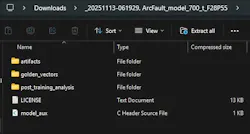
The artifacts contain the AI model compiled into a static library, which has all of the AI model information embedded in it. Figure 2 shows the contents of the artifacts folder, while Figure 3 shows the contents of the golden_vectors folder. The user_input_config.h represents concise information about all feature extraction transformers used in the training process. The application code in the software development kit (SDK) automatically understands the files mentioned above.


Step No. 2: Verifying Artifacts and Feature Extractions Using Test Vectors
To verify that the artifacts and feature extractions are working as expected, the test_vector.c file contains precise samples of input data from the true dataset provided and the corresponding expected output values.
There’s no need to open these files. As Figure 4 shows, the artifacts and golden vectors can be dragged and dropped onto an application project in the DigitalPower SDK example for arc fault detection. Just build the project and then run it to have an edge AI-enabled MCU capable of detecting DC arc faults.

Step No. 3: Validating the Model with Live Sensor Data
It’s possible to verify the model with actual sensor data. The steps to verify the model are the same as for data capture except for the selection of the Live Preview tab instead of the Capture tab (Fig. 5). Live Preview mode is useful for streaming the inference of the AI model on the screen.

The sampling frequency must be identical to the frequency of the collected data on which the AI model was trained. This is because all of the knowledge that the AI model learned during training is about patterns in the frequency spectrum and energy spectrum. A change in sampling frequency confuses the AI model’s understanding of how to extract valuable information from the datasets and, therefore, could cause the model to struggle achieving the desired accuracy.
Next, enter the number of samples, which should be large enough to create an arc fault in the hardware. For more details on configuring the application project to switch between inferencing on test vectors versus inferencing on live data, see the reference design “TIDA-010955 of the DigitalPower SDK for C2000 MCUs.”
When verifying the model, these aspects should be considered:
- The timestamp to activate the model execution.
- The processing time of the setup code.
- The size of the model if it’s also used in an existing application on an MCU, since the existing application also consumes compute and memory.
For arc fault detection, as well as other latency-critical condition monitoring tasks, model execution triggers every few milliseconds, with the total processing time within milliseconds. This low-latency operation helps enable proactive detection without impact on the important tasks. In a real-time control MCU such as the TI TMS320F28P550SJ, the main CPU offloads processing to the hardware accelerator dedicated to neural-network computation, thereby speeding up execution by 5X to 70X.
What’s Next?
After having completed the entire workflow, with iterations involving the curation of the right data, training using TI tools, compiling, and then deploying, keep these considerations in mind:
- Plan for model updates: An edge AI model isn’t a “set it and forget it” kind of tool; it needs additional tuning to enhance performance over time. After accumulating field data, it’s important to retrain the model periodically to improve performance. The beauty of the workflow covered in this article series is that it enables iterative processes: Import new data into Edge AI Studio or Tiny ML Modelmaker, retrain with expanded datasets, recompile, and push firmware updates. Essentially, consistent retraining will help systems deployed today become even more efficient six months from now.
- Scale across the product line: After proving the approach on one system, consider where else it may apply. The same CNN architecture that can detect arcs in solar combiners might adapt to battery-management systems or EV charging stations with minimal retraining. The infrastructure — data collection pipelines, training workflows, deployment frameworks — becomes reusable across applications.
- Validate in real operating conditions: Occasionally, the performance of the model once deployed in a real system may not be as satisfactory as the accuracy achieved during the training phase. The discrepancy may arise from differences between the training data collected in the lab and the actual setup. Therefore, ensure that the training data adequately covers the intended operating conditions and aligns closely with the real environment.
Conclusion
The fault-detection use case in this article series is only one example of how edge AI can bring more responsive, flexible automation to the electronics that enable our modern world. This proliferation of intelligence will continue to increase alongside innovations in hardware acceleration and design software for low-power, small size components like microcontrollers — with every advance making edge AI more approachable and impactful.
>>Download the PDF of the article, and check out the other parts of this series
dreamstime_kelpfish_11499764arc_dreamstime_436948156electrical_arc_dreamstime_l_436946687About the Author
 Adithya Thonse
Adithya Thonse
Systems Engineer, Texas Instruments
Adithya Thonse is a systems engineer for application-specific MCUs at Texas Instruments. He holds an engineering degree from the Indian Institute of Science (IISc).
Comment About the Article
To join the conversation, and become an exclusive member of Electronic Design, create an account today!
 Leaders Logo
Leaders relevant to this article: