How Heat is Reshaping AI Notebook Design
What you'll learn:
- Why AI workloads and acoustic limits are making notebook thermal design more difficult.
- How ionic cooling works and what tradeoffs it introduces versus traditional blower-based designs.
- How zoned, low-impedance architectures can improve cooling, board layout, and feature flexibility.
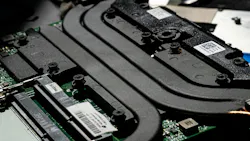
As laptops grow thinner and more powerful, system designers continue to face significant barriers to effective thermal management.
The integration of AI workloads, including voice-enabled assistants, large language models (LLMs), query processing, and photo editing, is driving up power consumption across CPUs, GPUs, and NPUs. Next-generation SoCs with integrated CPU, GPU, and NPU chiplets handling LLMs are expected to consume significantly more power.
As a result, it’s pushing notebook designers to look at new ways to add in AI without throttling the SoC and compromising system performance. Added requirements for memory and storage to support AI-related computing further complicate system design and integration.
Acoustic constraints compound the challenge as noise from traditional notebook blowers interferes with conversational AI and voice assistant performance, both of which are sensitive to background sounds. Achieving user-friendly noise levels of 20 to 25 dBA (measured at the Operator Position per ECMA 74, IEC 62368-1, and ISO 7779) requires employment of larger blowers moving at slower speeds.
The large footprint of these blowers, in turn, restricts internal layout options, presents routing challenges for high-speed signaling, and incurs additional costs for board manufacturing. For system design engineers, thermal and acoustic tradeoffs are now central to the viability of next-generation consumer systems.
Revolutionizing Notebook Designs for Modern AI Systems
Electrohydrodynamic (EHD) flow, also known as ionic cooling, is emerging as a new thermal design option. This solid-state approach to moving air uses no rotating blades and allows for completely silent operation. In general, ionic-cooling devices have comparable flow rates to traditional notebook blowers in installed conditions, although they generate significantly less pressure head.
Typical acoustic measurements on EHD-cooled laptops report noise levels on the order of 14 dBA (Operator Position), which is an order of magnitude quieter than a low-noise, fan-cooled system and well below the human threshold for auditory detection of broadband noise.
Ionic-cooling devices not only eliminate the noise caused by a traditional blower, but they also lead to more system design options and feature set choices. That’s because they have a smaller physical footprint and a high-aspect ratio shape, which is easier to integrate into the overall notebook layout. This opens up space within the system — ionic-cooling air movers are typically at the rear edge of the system, well clear of the motherboard and critical high-speed signaling paths.
The use of ionic cooling for notebook computers does introduce a new tradeoff that must be considered: the inherently low-pressure capability of these devices compared to traditional notebook blowers. Due to this characteristic, EHD devices should not be considered as simple “drop-in” replacements for high-pressure blowers, which can typically suffice in a system with a high-impedance traditional layout (impedance in this case is defined as resistance to air movement through the system created by components, blockages, vent grilles, etc.).
>>Download the PDF of this article, and check out the TechXchange for similarly themed articles and videos
 coolingsystem_dreamstime_395784486
 Promo Roman Snytsar Dreamstime Xxl 7193023
Instead, new lower-impedance layouts should be explored that take advantage of the ionic-cooling device’s flow characteristics and footprint. Aspects of low-impedance design that need particularly careful consideration include inlet and outlet vent designs, heat exchanger characteristics, and placement within the system.
Ionic-Cooling Solutions Today
Ionic-cooling devices use electric fields to move air. Rather than relying on spinning rotors, they utilize a high-voltage, low-current electric field between paired electrodes to ionize and accelerate air molecules. Charged air molecules are created near a high-voltage emitter wire and driven toward a grounded collector electrode by electrostatic forces. As the ions travel, they collide frequently with neutral air molecules, transferring momentum to the bulk air, resulting in a steady, directed ionic wind.
This approach eliminates moving parts entirely, offering a solid-state method of cooling that’s compact, reliable, and silent (acoustic fan noise is created primarily by unsteadiness in the flow created by the motion of discrete fan blades, which aren’t present in ionic-cooling devices).
One example is Ventiva’s thermal-management subsystem (Fig. 1). It’s a fully integrated ionic-cooling solution that fits easily within a modern laptop. Modularly designed and configurable, the subsystem is comprised of an EHD device(s), power supply, heat exchanger fin stack, and vapor chamber or heat pipe connected to an appropriate xPU/SoC cold plate.
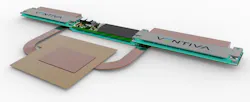
The individual ionic air-moving devices are thin and small, freeing up to 60% of the board space currently occupied by traditional blowers, allowing designers to increase the battery size or add system functionality without changing the overall system size. With proper low-impedance venting and careful attention to airflow pathways within the notebook, the thermal subsystem can be positioned in a variety of different ways to provide effective cooling while simultaneously accommodating and enabling any specific Industrial Design (ID) requirements.
A dedicated modular power supply in the subsystem is connected to either the motherboard’s 5-V rail or to the higher-voltage battery-charging rail directly. It then steps that voltage up to approximately 5,000 V (<1 mA), which is required to drive the corona-discharge ionization process. Connecting the power supply to the higher-voltage battery-charging rail directly improves the overall efficiency of the power delivery by eliminating multiple stages of voltage conversion.
A specially designed smart DC-DC converter is used that not only delivers the low-current, high-voltage supply, but also monitors the health and status of the system. Furthermore, the ionic-cooling device and power supply include technology for detecting and removing dust and contaminants from the electrodes, which might otherwise impact performance.
With a low profile of 4.5 mm, the power-supply design ensures that appropriate keep-out zones are maintained for all high-voltage circuitry, while potting and components coatings protect against any kind of direct contact. Extensive reliability testing has been done to ensure no RF/EMI is associated with the device operating voltages. There’s also a safety interconnect that ensures the device(s) are powered off if the case is opened.
A single power supply is able to drive multiple ionic cooling devices. Multiple devices within a single system can be used to augment total flow or split thermal management into multiple air streams in parallel, which lowers overall system impedance and improves cooling.
The controller for the individual ionic-cooling devices is integrated into the power supply and takes the same instructions (pulse-width modulation or PWM) that would be sent to a blower. So, to the motherboard, the air mover is indistinguishable from a traditional blower.
Zoned Cooling: A New Architectural Approach to Thermal Management
The form factor of ionic-cooling devices is a significant advantage to the designer and a foundational enabler of a zoned cooling design (Fig. 2).
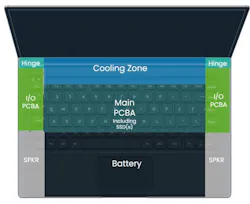
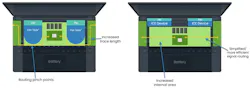
The zoned cooling approach breaks the system down into discrete zones for battery, computing, and cooling, which allows for greater design flexibility. The ideal placement location for the rectangular “cooling zone” is at the back of the laptop, north of the motherboard. At this location, the thermal solution doesn’t require the traditional motherboard fan cutouts that interfere with high-speed signaling, have poor panelization (manufacturing cost), and drive high layer counts (also a cost adder).
A comparison of motherboard area utilization is shown in Figure 3. This approach synergizes well with the goal of system impedance reduction — the device air-flow paths can be very short and easily connected in parallel across the rear edge of the laptop system.
In a parallel flow configuration (Fig. 4), the ionic-cooling devices can be controlled independently to provide the right amount of cooling for the right components precisely and efficiently where it’s most needed. For example, if AI compute components aren’t being exercised, the system thermal control can focus on driving the air movers responsible for CPU cooling.
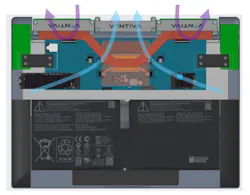
For any given usage scenario, the appropriate number and arrangements of devices can be activated based on existing system telemetry. Thus, the system needn’t be over-designed for a worst-case situation. One ionic-cooling device connected to a heat exchanger could cool the main processor complex, while another in the middle of the system provides cooling to the skin of the laptop, and a third might be dedicated to the memory subsystem — all working in concert to avoid throttling the performance of the notebook without ever over-cooling idle components.
With a parallel architecture, each air mover is controlled independently by the system thermal-management algorithms. This provides for system design optimization of operating efficiency as well as a lower flow impedance not possible with a traditional blower solution.
Ionic-cooling air movers also enable a more modular and optimized system design. Individual ionic-cooling devices are built in various widths — within reason, they can be as wide or as narrow as required, and they can be stacked for larger systems requiring more air flow. For instance, longer blowers with proportionally more flow can be stacked for use in a 17-in. workstation/gaming notebook that has a larger chassis and high-power feature set relative to an ultra-thin 13-in. notebook. Smaller devices can also be easily added to other areas of the system to address specific hot spots.
In the compute zone, laptop developers can use the space previously occupied by the blowers for other features, such as added memory or dedicated AI processors/NPUs. This gives OEMs more options for creating feature-rich differentiated platforms.
Overall, the compute zone offers a simpler, smaller, rectangular PCB design with fewer layers. It’s also a design that can easily be leveraged across an entire product line, rather than requiring a completely unique motherboard design for each model. The rectangular shape used in the zoned cooling approach also improves the panelization in production, with lower board scrap costs that come from the circular cutouts and inefficient layouts.
Real System Demonstrations
Figure 5 shows a zoned cooling design that’s been implemented in multiple 14-in. AI-ready notebook reference designs. These systems are cooled by a Ventiva thermal-management submodule with three ionic-cooling devices. They support a 28-W CPU (44.3 W total platform power) in a sub-16-mm chassis.
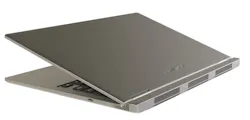
Features include 77-Wh battery, full 2280 SSD support (potentially multiple 2280 SSDs), and Microsoft Copilot+ readiness. The parallel array and innovative venting strategies reduce impedance, increase cooling efficiency, and create a scalable thermal pathway for future systems.
As described above, the ionic-cooling device performance can easily be scaled across different laptop families, simplifying the motherboard and system designs. For example, by stacking multiple devices, support for a 35-W CPU TDP is possible in a 16-mm-thick form factor, or two devices can be placed side-by-side for an ultra-thin <12-mm system with a 15 W TDP.
Conclusion
Next-generation air movers based on electrohydrodynamic technology can radically enhance the way notebooks are designed and manufactured. They provide users with silent, high-performance AI systems that have more features yet lower system cost.
Using solid-state EHD air movers such as Ventiva’s ionic-cooling solutions help to eliminate the need for traditional blowers, giving designers more space on the motherboard as well as lower costs in production and product management. It also meets the demands of users wanting to tap into the latest AI technologies without interference or disruption from the sound of a whining blower.
>>Download the PDF of this article, and check out the TechXchange for similarly themed articles and videos
coolingsystem_dreamstime_395784486Promo Roman Snytsar Dreamstime Xxl 7193023About the Author
 Mark MacDonald
Mark MacDonald
Thermal Systems Lead, Ventiva
Mark MacDonald is the Thermal Systems Lead for Ventiva, where he focuses on the integration of electrohydrodynamic air movers into traditional electronics cooling applications. Prior to this, he spent close to 20 years directing thermal, mechanical, and acoustic platform technology development as a Principal Engineer at Intel Corp.Mark teaches heat transfer and thermofluids at Portland State University. He has a Ph.D. from Cornell University and holds approximately 70 U.S. patents.
Comment About the Article
To join the conversation, and become an exclusive member of Electronic Design, create an account today!
 Leaders Logo
Leaders relevant to this article: