The Language of Test Equipment: A Guide to ASCII and SCPI Instrument Control
What you'll learn:
- Leveraging ASCII strings to control a test instrument.
- Steps in the process of using ASCII for instrument control.
- Standardization and implementation of SCPI as a control methodology.
Normally my articles are about something power-related, like battery testing, ac grid simulation, or general power-supply technology topics. Instead, this article will pull up to a higher level and talk about a topic related to all general automated test equipment regarding how to control automated test instruments.
When controlling automated instruments, many technologies involve a library that implements a specific application programming interface (API). In these cases, you get a library that can be added to your test programming environment. To control or take data from the instrument, you’ll have a specific library call that creates the desired action on the instrument, such as setting a range or calling on a specific measurement function.
While this is a quite straightforward way to control a device, these libraries tend to have two shortfalls: The library needs to be written to work specifically with your programming environment, and it’s normally designed to work with a specific piece of hardware or specific instrument.
ASCII Control as an Alternative
There’s another method where the instrument can be controlled from any programming environment without any specific API driver library. In this approach, the instrument responds to ASCII strings to send control instructions and respond back to the programming environment with measurement data formatted as ASCII strings. To make this work, you need three pieces:
- An instrument that can receive ASCII strings, act on them, and respond back with ASCII string measurement data.
- A hardware IO interface in the host PC over which this data can flow. Today, this interface is most often Ethernet or USB.
- An IO Library on the host computer that allows your programming environment to send and receive ASCII strings over Ethernet or USB. Two examples of these are the Keysight IO Library rom Keysight Technologies and the NI MAX (Measurement & Automation Explorer) from NI (formerly National Instruments).
The Process… in General Terms
- You’re developing test software in some programming environment, like Python.
- You have an instrument with a USB interface as a USB device. (Note that the process would be the same for an instrument on Ethernet.) This USB is a USB device interface like you’d find on a printer. It’s not a USB host interface that can accept USB devices, like a USB storage device.
- The IO library is configured to send strings out over the USB interface to a specific USB address where the instrument is located. In some programming environments, these addresses are set up and configured as variables or handles that are passed to the IO library. In other cases, you can pass the USB address directly as part of the library call to send the string.
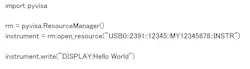
- Let’s assume you want the instrument to display “Hello World” on its front panel. The instrument’s instruction to display text is “Display: <text>”, where <text> would be “Hello World”. Thus, “Display: Hello World” is the ASCII string you need to send to the instrument over USB.
- Within your Python script, you call the IO library to send the ASCII string “Display: Hello World” over the USB interface to the specific USB address where the instrument is located (Fig. 1).
- The IO library knows how to take the ASCII string and route it over the USB to the proper address. You can think of it like printing the string to the instrument.
- The instrument receives the ASCII string. If the string contains a supported command that’s syntactically correct per the description in the instrument’s manual, the instrument will act on the string and display “Hello World”.
Now, let’s look at a more practical example. Your instrument is a digital multimeter (DMM) and you want to measure the voltage on a lithium-ion cell that’s at 3.65 V. In this case, two transactions need to happen: send a Measure command and receive the data.
- First, you need to send a command to the DMM to ask for a measurement. In this example, let’s say that command is “Measure Voltage”.
- From your Python script, like in the previous example, you call the IO Library to send the ASCII string “Measure Voltage” out over the USB interface to the instrument’s USB address. This will look very similar to the code snippet in Figure 1.
- The instrument receives this ASCII string and acts on it. First, it checks if the command is supported and syntactically correct. If not, an error is generated and usually this will be indicated by an error annunciator on the instrument front panel. The instrument will also log the error, which can be subsequently checked using another set of transactions to confirm success or failure of the execution of the instruction.
- Assuming the ASCII string is correct, the instrument takes a measurement and places “3.6500” in the instrument’s output buffer. At this point, the instrument is ready and waiting for the next transaction to pull the data from this buffer.
- Next, the Python script requests from the IO Library to read data from the DMM at its USB address. In most programming environments, when you ask for a response to be returned from the instrument, you need to provide some kind of storage location for the string that will be returned. This could be a pointer to string storage, or just a name of a variable. The IO Library is designed to know how to fill in the data storage location.
- The IO Library handshakes with the instrument to pull the data from the instrument’s output buffer where the “3.6500” ASCII string is stored.
- The IO Library places the “3.6500” into the variable supplied by the read data command.
- This ends the instrument measurement transaction.
- Now, the data is stored in the variable and available to the programming environment to take action. Your Python script might display the value, or use it in a calculation, or store it in a database.
A Long Time Ago in a Galaxy Far, Far Away …
Computer programmable test instrumentation goes back to the 1970s, but the instrument control method described above became practical in the early 1980s. At that time, there were two kinds of computers available to test engineers.
The IBM PC and similar MS-DOS, and eventually Windows platforms, were readily available as office automation took hold. The PC that was used for word processing and spreadsheets also had programming environments like MS-BASIC and later C and Visual Basic.
The available IO hardware interface was RS-232, but specialized plug-in card interfaces, like GPIB as defined by the IEEE-488 standard, were also available. The NI GPIB card added the GPIB hardware interface and together with its driver libraries, allowed programmers to send ASCII commands out from MS-BASIC, C, and Visual Basic to instruments that had a GPIB interface. Likewise, Hewlett-Packard (from which Keysight Technologies is an offshoot) had its version, and it continues today as the aforementioned Keysight IO Libraries.
Also at that time were a variety of dedicated instrument controllers — specialized computers designed for controlling instruments. Typically, these instrument controllers had their own unique programming languages.
For example, Hewlett-Packard had an instrument controller platform called the HP Series 200 with a standard built-in GPIB interface. This Series 200 controller ran a combination operating system/programming language called Rocky Mountain Basic (RMB). RMB allowed programmers to use a rich, sophisticated BASIC language that was optimized for engineering tasks and instrument control. It could natively send and receive ASCII strings over GPIB without any kind of extra IO Library.
But as PCs became more powerful and ubiquitous, these specialized computers became less popular and eventually obsolete. Today, a PC running Windows or Linux is the dominant platform for instrument control.
From the instrument side, in the beginning, there was no standardization of their ASCII command sets. Each instrument model, even from within the same manufacturer, had its own ASCII string command set optimized for that instrument design.
In those early days, when instrument CPUs were extremely limited, the commands needed to be extremely simple. For example, to change range on a DMM, the command was “R1” for range 1, “R2” for range 2. While these ASCII strings are readable, a test engineer may find it difficult to understand the actual test programming without knowing the ranges on the DMM. And if you have multiple different DMMs, the “R2” could mean a different range on each DMM.
Thus, early ASCII instrument control was difficult to use and maintain because every instrument had its own vendor- and model-specific command set. It made programs hard to read, interpret, and reuse across different instruments.
SCPI Arrives
In 1990, the automated test industry standardized on a common ASCII command set, called Standard Commands for Programmable Instruments (SCPI). This standardization defined a rich set of commands and syntax for how an instrument’s remote programming interface would operate. Thus, a SCPI-compatible instrument from any vendor will program the same way using the same commands.
Furthermore, common functions are programmed the same way even across different instrument types. For example, “MEASure CURRent” is the same command for a DMM to measure and return a current reading as it is for a power supply to measure and return a current reading (Fig. 2).
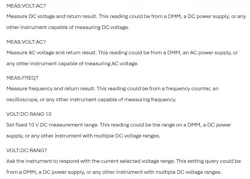
For example, the command to "Measure a DC voltage" would take the form MEASure:VOLTage:DC?, and the command to "Measure an AC current" would take the form MEASure:CURRent:AC?.
This has two advantages. First, test programs written can be reused as instruments were changed. Second, within test programs, the instrument IO operations are self-documenting, thanks to the meaningful commands that were human readable and understandable. And more than 35 years since SCPI was introduced, SCPI is still the dominant “language” of ASCII controlled instruments.
Of course, SCPI isn’t the cure-all. While the many fundamental functions were similar across same instrument types, features and capabilities that were unique to a specific instrument would have no common command in SCPI.
The developers of these instruments desired to follow SCPI style and syntax, but sometimes new and unique commands needed to be created for these unique capabilities. As a result, a program written to take advantage of the unique features of a specialized instrument might not work on the common version of the instrument. However, the self-documenting aspect of SCPI means the unique commands are still human readable and will have predictable syntax and behavior.
Summary
Automated test systems depend on reliable communication between software and instruments. For non-API-based instruments, fundamental instrument control begins with the exchange of simple ASCII text strings between a test program and an instrument over interfaces such as USB, Ethernet, RS-232, or GPIB. IO libraries enable software environments such as Python and C to send ASCII commands and receive ASCII measurement data.
The introduction of SCPI in 1990 standardized command syntax across instrument types and manufacturers. Thus, SCPI enabled greater software portability, improved readability of test code, and simplified automated test development. More than three decades later, SCPI remains the dominant language for programmable test equipment and continues to provide the foundation for modern automated test and measurement systems.
>>Download the PDF of this article
 dreamstime_wave_break_media_ltd__419592724
About the Author
 Bob Zollo
Bob Zollo
Solution Architect for Battery Testing, Electronic Industrial Solutions Group
Bob Zollo is solution architect for battery testing for energy and automotive solutions in the Electronic Industrial Solutions Group of Keysight Technologies. Bob has been with Keysight since 1984 and holds a degree in electrical engineering from Stevens Institute of Technology, Hoboken, N.J. He can be contacted at [email protected].
Related
dreamstime_wave_break_media_ltd__419592724

Comment About the Article
To join the conversation, and become an exclusive member of Electronic Design, create an account today!
 Leaders Logo
Leaders relevant to this article: