Transform the Raspberry Pi Zero into a Programmable Arduino with PiZZa
What you’ll learn:
- How PiZZa replaces Raspberry Pi OS with Zephyr RTOS on the Pi Zero.
- How Arduino sketches are uploaded over USB, stored on microSD, and loaded as Zephyr modules.
- Why PiZZa improves real-time hardware control and where its current CPU-core limitation remains.
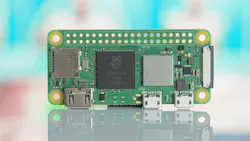
When it comes to projects, there are two electronics boards to choose from: single-board computer (SBC) or a microcontroller development board (MDB). Both are equally great and have their places in the project ecosystem, but in general, the SBC offers more processing power while the MDB executes programs more quickly due to its firmware execution. What PiZZa (Raspberry Pi Zero on Zephyr RTOS) does is create the best of both by turning a Raspberry Pi Zero W (Fig. 1) into an Arduino board through software and firmware.
Typically, a Raspberry Pi runs a full operating system known as the Raspberry Pi OS, which provides a lot of functionality, but it also adds functions and features that aren’t designed for the same kind of real-time control found with microcontrollers. PiZZa brings a different approach as it runs Zephyr directly on the Pi and provides an Arduino board package, allowing the Raspberry Pi to appear as an Arduino-compatible platform found in the Arduino IDE. Users can then write Arduino sketches and upload them to the Pi over a single USB cable.
Enter Zephyr
As mentioned earlier, the key to this transformation lies with the Zephyr RTOS. Instead of booting with the Raspberry Pi OS and running an Arduino program inside that operating system, PiZZa boots the Raspberry Pi directly into a Zephyr-based environment. Zephyr provides both the operating system and hardware/driver framework needed to communicate with the Pi's processor and peripherals, including the GPIO controller, SPI, I2C, PWM, SD card, USB device controller, and Wi-Fi hardware.
The Arduino part works via the Arduino sketch loader. When users press Upload in the Arduino IDE, the sketch is transferred to the Pi over USB. PiZZa stores the sketch on the SD card and loads it as a Zephyr module rather than needing to completely reflash the Raspberry Pi when using a new program.
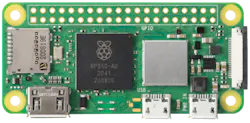
It should be noted that Zephyr is designed for real-time embedded applications, meaning programs can interact with hardware more quickly than they would when running inside a general-purpose operating system. This makes PiZZa (Fig. 2) ideal for projects that need precision control of GPIO, sensors, motors, communications interfaces, and other hardware.
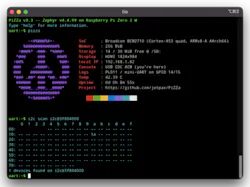
There’s one drawback of the current PiZZa version, as it doesn't typically use all four Zero 2 W CPU cores for every application. The GitHub page notes that the shipped shell images are currently single-core, while SMP support exists and some applications can use all four cores.
It’s fair to say that PiZZa transforms a Raspberry Pi Zero 2 W and the original Zero into an Arduino, but what it actually does is blur the line between SBC and microcontroller. Traditionally, we choose a Raspberry Pi when projects require a powerful computer running an operating system and grab an Arduino when projects need simple hardware control.
PiZZa lets a Raspberry Pi Zero 2 W operate more like an embedded development board while still having access to hardware that’s much more powerful than what’s found on a typical Arduino. Because it’s just software, users don’t need to modify the Pi. They can just flash the PIZZa image to a microSD card, throw it into the Pi Zero, connect a USB cable, and start loading programs. Easy.
>>Check out these TechXchanges for similarly themed articles and videos

About the Author
 Cabe Atwell
Cabe Atwell
Technology Editor, Electronic Design
Cabe is a Technology Editor for Electronic Design.
Engineer, Machinist, Cartoonist, Maker, Writer. A graduate Electrical Engineer actively plying his expertise in the industry and at his company, Gunhead. When not designing/building, he creates a steady torrent of projects and content in the media world. Many of his projects and articles are online at element14 & SolidSmack, industry-focused work at EETimes & EDN, and offbeat articles at Make Magazine. Currently, you can find him hosting webinars and contributing to Electronic Design and Machine Design.
Cabe is an electrical engineer, design consultant and author with 25 years’ experience. His most recent book is “Essential 555 IC: Design, Configure, and Create Clever Circuits”
Cabe writes the Engineering Life & Engineering on Friday blog on Electronic Design.
See Cabe's cartoons & comic strips here.
Comment About the Article
To join the conversation, and become an exclusive member of Electronic Design, create an account today!
 Leaders Logo
Leaders relevant to this article: