Clickbait: Defining the Feel of Tactile Switches
What you'll learn:
- What parameters define how a tactile switch “feels” to the touch.
- Why tactile ratio, not operating force, determines the crispness of a click.
- How the feel of the switch changes over the component’s life, and why the assembly around the switch often matters more than the switch itself.
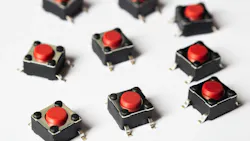
Ask 10 engineers what makes a switch feel good and you get 10 different answers: crisp, mushy, clicky, dead, premium. These terms are imprecise, but the behavior under each one boils down to a set of physical forces.
The feel of an electromechanical switch is the sum of several quantities that can be adjusted to produce different sensations: how hard you press, how far the button travels, how sharply the contact snaps over, and how the snappiness of the switch fades over time due to wear. Specify these parameters in the spec instead of leaving them to chance, and most complaints about the feel of the user interface turn into something you can settle during the design process.
The rest of this article puts numbers to these quantities, covering what each one means and how they change across four common switch families, and it ends with how to weigh them when selecting a part. These values come from actual production switches, not idealized curves.
The Parameters that Define the Feel of the Switch
Four numbers do most of the work:
Operating force is how hard you press to actuate the switch, in grams-force (gf). It mostly sets whether a button reads as light or stiff. A tactile dome that actuates around 260 gf feels firm, while one near 150 gf feels quick and light. Watch one thing here: Operating force is the rated actuation point, which is a different number from the peak force on the force-travel curve. People constantly mix up the two.
Travel, or stroke, is how far the actuator moves before the contact closes. A quarter of a millimeter, typical for a tact switch, reads as crisp and immediate. Stretch that to a couple of millimeters, as on a slide or self-lock switch, and the press starts to feel deliberate.
Return force is how strongly the actuator springs back when you let go of the button. Without enough return force, the button can feel sticky, almost gummy. Roughly 20 gf of return on a tactile part is enough to keep the action clean.
The tactile, or click, ratio is the snap itself. It’s what most people are reaching for when they say “clicky.” How hard the click feels tracks this ratio rather than the raw operating force, which is why a lighter switch can snap harder than a heavier one. The ratio falls out of the force-travel curve.
Understanding The Force-Travel Curve of the Switch
Press a tactile switch slowly and the reaction force doesn’t climb in a straight line. It builds to a peak as the metal dome loads, then falls off sharply the instant the dome buckles and snaps through onto the contact below. Plot that reaction force against travel, and you have the curve that defines tactile feel (Fig. 1). The peak sits on this curve; it’s not the operating force outlined on the datasheet. There are actually two different points.
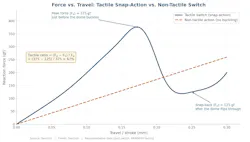
The tactile ratio puts a number on that snap. On one of Swiclick’s tact switches, the dome peaks at about 375 gf right before it buckles, and the force at the bottom of the snap settles near 125 gf. The ratio is the drop divided by the peak: (375 − 125) / 375, or about 67%. The larger that gap between peak and snap-back, the crisper and louder the click.
A non-tactile action looks different on the same plot. With no buckling mechanism, the curve is basically a straight line rising with travel — there’s no peak, no drop, and so nothing to hear. That flat line is what “no tactile feedback” means on a graph, and plenty of designs want exactly such an outcome.
How Feel Differs Depending on the Type of Switch
The same four parameters take very different values from one family to the next. The table below pulls one representative production part from each of Swiclick’s four families — tact switch, micro (snap-action) switch, self-lock (push-push) switch, and slide switch — and lines up the feel numbers against the electrical specs. Figure 2 charts the same data.
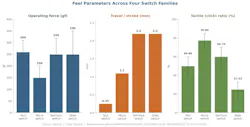
One of the takeaways here is that the tact switch pairs short travel with a moderate-to-high tactile ratio, which is what gives the sensation of the crisp, light button behind a membrane or keypad.
Conversely, the micro switch carries the highest tactile ratio in the group (70% to 85%), so its snap reads as positive and audible even though its rated operating force comes in below that of the tact switch. This is proof that snap tracks the ratio and not the operating force, which is worth remembering the next time you’re tempted to specify a stiffer switch just to get a louder click. The micro switch also switches real load, several amps, not just logic-level signals.
The self-lock switch sits in the middle on ratio but adds long travel and a latching action: Press it, and it stays down until you press again, so the feel carries a real mechanical commitment.
Finally, the slide switch has the lowest ratio of all the product families — it’s built to glide, not click.
Notice that contact resistance holds at or below 100 mΩ across all four families. The feel and electrical performance of the switch depend on separate mechanisms. Two switches can feel nothing alike and yet still hit the same resistance number. Because of that, you need to consider more than the electrical rating to figure out the feel of the switch.
Where the Snap Comes From: The Dome Buckles
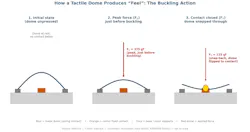
The snap is a purely mechanical event. At rest, the metal dome sits arched over the center contact. Push on it and the dome’s reaction force climbs to a peak right before it gives way; then it flips through, the reaction force drops to the snap-back value, and the dome lands on the center contact to close the circuit (Fig. 3). That flip going down, and the spring-back when you let off, is the click felt by your finger.
Switch Feel: Why and How It Changes Over the Part’s Life
Here’s the part that rarely makes it onto a datasheet: The switch’s feel degrades with use. Cycle a tactile switch (they’re typically rated anywhere from 100,000 to a million operations) and the metal dome slowly fatigues. Operating force drops off, the return weakens, and the action goes soft. A button that felt crisp out of the box can feel mushy near the end of its life while still making perfectly good electrical contact.
That same wear shows up electrically. Every press rubs the contact against the base, and over enough cycles the plating gets thinner and the effective contact area shrinks. Thus, the contact resistance creeps up over time. That’s where the two dominant failure modes come from: A dome flipped too many times degrades and stops springing back, and worn plating pushes contact resistance out of spec.
The solution is to leave margin on both the mechanical and the electrical side, and feel and function both stay inside the window you designed for — all the way to end of life.
The Most Common Mistake When It Comes to Tactile Switches
The most common problem encountered by engineers isn’t the switch itself, but everything stacked on top of it. A switch that feels perfect bare can feel worse the moment it’s sitting under a button cap, a silicone pad, or a panel overlay. Every one of those layers changes the force actually felt by the user and can move the point in the travel where the contact closes.
As a result, engineers can get stuck re-tuning the switch when what’s causing the problem is somewhere in the stackup. Take a silicone keypad: Button feel depends on how fast the rubber collapses and on the shape of the plunger. Get the plunger core and the pre-travel right and even an off-axis press lands clean; get them wrong, and you can tune the switch all day without fixing it.
Ultimately, it’s necessary to measure and specify the feel of the switch based on the finished assembly, not the bare switch, and track down what changed within the assembly before you start adjusting the switch itself.
Figuring Out Switch Feel, By Application
After figuring out the desired feel of the switch, picking a part mostly comes down to navigating the tradeoffs between components:
Medical and safety-critical interfaces require tactile feedback that can’t be misread — a clear, positive confirmation the switch fired, so nobody is hovering over a defibrillator wondering whether the press registered. Automotive controls need a sensitive, refined action, and what matters more than anything is part-to-part consistency. Every unit off the line has to feel like the last one.
Industrial controls are all about robustness, which means more force and a firmer return. The force must be strong enough that the button press still registers through a glove in a loud room where the audible click of the switch may be significantly dampened. Gloved operation is worth testing for separately. Set the operating force somewhat above the bare-finger value, then confirm it on a force gauge rather than trusting your fingertips.
Slim consumer electronics run into the thin-design squeeze. Less height means less travel, and less travel usually means weaker feel. The usual fix is a low operating force paired with that short travel, so the press reads as quick rather than flimsy.
Engineering the Sensation of a Switch
Operating force, travel, return force, and tactile ratio are the real-world quantities that define what a switch feels like. The force-travel curve explains why the switch feels the way it feels, while rigorous cycle testing tells you how the switch will drift over time. Get those onto the spec sheet at the assembly level, not just the component level, and the next time somebody says the button feels off, you’ll know where to go looking instead of arguing about it.
>>Download the PDF of this article
 dreamstime_jordivillar_453897052
About the Author
 Liu Junxiong
Liu Junxiong
R&D Engineer, Swiclick
Liu Junxiong is an R&D engineer at Swiclick, where he leads switch mechanical design and project management. His work focuses on the tactile and electrical performance of miniature switches, including force-travel characterization, contact reliability, and tuning switch feel for automotive, medical, industrial, and consumer applications.

Comment About the Article
To join the conversation, and become an exclusive member of Electronic Design, create an account today!
 Leaders Logo
Leaders relevant to this article: